Automatic planning for care day centres, without migration or training.
One sick call at 7:30 am. The coordinator spends an hour manually reshuffling — who goes where, which groups still have enough staff, which client absolutely cannot be moved. The result works on paper, but doesn't feel right. And next week it starts all over again.
When staffing falls short, one day centre moves to low staffing: one staff member stays with a small group, so clients who need routine are not disrupted. The other staff members are freed as butterflies — they go where they are needed most.
The coordinator defines this in a base template. That way, low staffing becomes a predictable part of the weekly routine — familiar to clients and staff, not disruptive.
Link your existing Google Sheets or Excel file. Your data stays in your own environment. Nothing is migrated or replaced.
"Sofie is unexpectedly off today." "Karl is having a rough morning — he'd rather not go to Creative." "Pieter and Jonas shouldn't be in the same group this week." "Movement can only handle three clients per staff member right now." "On Tuesdays someone takes a group for a walk." LiefRooster works through all of it and delivers a proposal that fits.
Adjust anything that doesn't feel right — one action, no explanation needed. Once published, staff see their week immediately in the mobile app.
The schedule is built weekly, but can be updated at any point. When something unexpected happens, you don't start over — LiefRooster recalculates the proposal based on the new situation. You review, adjust where needed, and publish. The calculation is the system's. The decision is always yours.
Override anything, anytime. No explanation required.No WhatsApp photo of a spreadsheet. You see your schedule in the app — clear, on time, fair. When the planning changes, you get an automatic notification. No missed messages in a group chat.
Fair rotation, visible to everyone.Your coordinator spends time on people, not spreadsheets. Fairness tracking gives you the data your works council expects.
Your data stays in your own spreadsheet. Always.Your staff keep working in the environment they know. The planning coordinator gets a smart planner and a planning assistant that understands the context. No migration, no learning curve for the team.
Two screens do most of the work. The year overview shows where every week stands in the planning cycle. The week screen is where you review, adjust, and publish.
Year overview
Week schedule
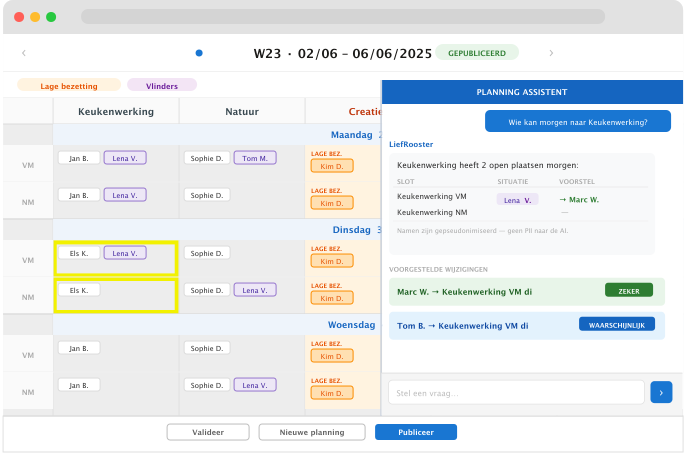
Ask questions about the schedule in plain language. The assistant analyses the rota, highlights critical slots, and suggests concrete changes — with a confidence level per suggestion.
Planning assistant — Q&A and slot highlights
Request a personal demo — we'll get in touch within 24 hours to schedule it together.